
How to stop overselling on Shopify (cap it per order)
Updated July 2026 · 6 minute read · Applies to every Shopify plan
Shopify has no native setting that caps how much of one product a single order can take. The two settings that sound like they do this are actually built for something else. "Continue selling when out of stock" is a switch for whether an order can push inventory below zero, not a per-order ceiling. Quantity rules only apply inside a B2B catalog, not to regular retail checkout. A real per-order cap has to be enforced at checkout itself, which Shopify supports through checkout validation Functions but does not expose in settings.
What each native tool actually caps
| Where | Cost | Blocks Shop Pay / Apple Pay | What it actually caps | Verdict |
|---|---|---|---|---|
| Continue selling when out of stock | Free, native | Not a cap at all | Whether inventory can go below zero | Wrong tool |
| Quantity rules in Catalogs | Free, native | Yes | Units per variant, B2B buyers only | B2B only |
| Order value limits via Checkout Blocks | Free, native, every plan | Yes | Order subtotal in dollars, not units | Caps dollars |
| Checkout validation | Your own Function, or an app | Yes, every path | Units of one product, every customer | Holds |
Why one order can clear out your stock
Default Shopify checkout does not limit how many units of a product one order can contain. If you have 40 units of a product and a single shopper adds all 40 to their cart, checkout lets that order through as long as the stock is there. Nothing in a fresh Shopify store stops it. That is not a bug. Shopify simply never shipped a merchant-facing quantity cap for this outside of B2B. If you sell limited drops, raffle-style releases, or anything where one order taking the whole batch is a problem, you are looking for a setting that does not exist in admin.
First, rule out "Continue selling when out of stock"
This is the setting merchants usually find first, and it is worth checking, but it solves a different problem. It lives on each variant, in the Inventory section, and you can only turn it on after "Track quantity" is turned on for that variant. With it off, once a variant's inventory hits zero, checkout will not let anyone buy more of it. With it on, orders can keep drawing that variant's inventory below zero, which is useful for preorders and backorders but is the opposite of a per-order limit. It also does not apply to Shopify POS: in person, staff get a warning before selling something that is not available, but the sale is not blocked.
If one order took your last 40 units and every other shopper now sees "sold out", this setting was not the cause and turning it off will not stop it from happening again. It is a floor on inventory, not a ceiling on one order.
Option 1: quantity rules (native, free, B2B only)
Shopify does have a native minimum, maximum, and increment per variant, called quantity rules. The defaults are a minimum of 1, no maximum, and an increment of 1. The catch is where you set them. Quantity rules are configured in Markets > Catalogs, and catalogs are a B2B feature. There is no equivalent screen for capping quantity on a regular retail order. If your store sells only direct to consumer, this option is not available to you at all.
Option 2: order value limits via Checkout Blocks (native, but it caps dollars, not units)
Shopify also ships a native way to block checkout by order subtotal, through the Checkout Blocks app, which is built on Shopify Functions. You set a minimum and maximum order value and checkout blocks anything outside that range. As of April 2026 this is available on every plan, Basic, Grow, and Advanced included, not just Plus.
It answers a different question. A $1,000 order maximum does not stop a shopper from putting 500 units of a $2 product into one order, since Checkout Blocks checks the total, not the quantity of any single line. If your problem is one product selling out to one order, order value limits will not catch it.
Option 3: cap it at checkout itself
The layer that can actually do this is the same one Checkout Blocks is built on: cart and checkout validation Functions. A validation rule runs on Shopify's own servers and can block checkout when a rule is not met. Shopify's documentation lists the surfaces this covers as online store carts, carts built for custom storefronts, and checkout itself. In practice that means the cart page, a direct checkout link, and express wallets like Shop Pay and Apple Pay all run through the same check, since nothing about it lives in your theme.
This is not a hypothetical use case either. Shopify's own Functions API documentation ships a worked example called "Limit product quantity based on product metafields" that blocks checkout once a cart's quantity of a product passes a configured limit. The platform supports exactly this. It just gives you no settings screen for it: you write the Function yourself, or you use an app that manages one for you. One technical ceiling worth knowing: a store can have at most 25 validation Functions active at once.
This is the part our app does
Mastiff Order Limits
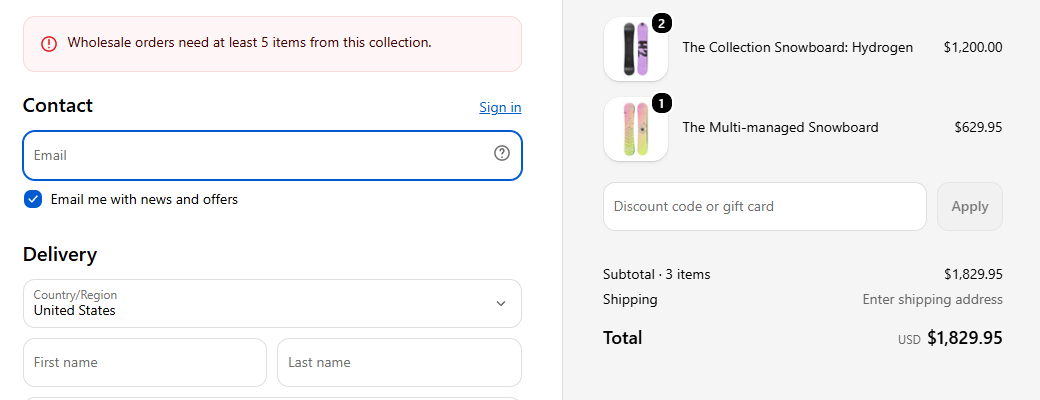
Order rules enforced at checkout: minimum and maximum order value, minimum and maximum quantity, and sell-in-multiples, all through Shopify's own checkout validation, express wallets included. You set a per-product quantity cap in plain English and test it against any cart in the built-in simulator. What the simulator shows is what checkout enforces. One rule is free forever, which is exactly enough for a single quantity cap on your one limited product.
What this cannot do, whatever you use
- Point of sale orders and draft orders you create in admin are not among the surfaces Shopify lists for checkout validation, so a per-order cap set up for online checkout does not reach them.
- A per-order cap stops one order from taking more than its limit. It does not replace inventory sync across warehouses or sales channels, and it is not the thing standing between two shoppers checking out for the same last unit at the same moment. Shopify already handles that at the platform level: when a buyer starts paying, the unit is reserved, and the quantity is only permanently deducted from your inventory once that payment succeeds, specifically so two buyers cannot both claim it. A per-order cap and Shopify's own inventory reservation are two different layers solving two different problems, and an order-limits app only touches the first one.
Which should you use?
If your store is B2B and the limit only needs to apply to wholesale buyers, quantity rules in Catalogs are free and native. If the goal is a floor under your total order value, Checkout Blocks now covers that on every plan. But if the actual problem is one retail order taking too much of one product, neither native option reaches it. That needs checkout validation, through your own Function or an app like ours.