
How to make Shopify sell in multiples (case packs, pairs, dozens)
Updated July 2026 · 3 minute read · Applies to every Shopify plan
If you wholesale candles in boxes of 12, sell socks in pairs, or ship tiles by the case, you have hit this problem. Shopify happily lets someone order 7 of a thing you can only ship in sixes. Then you email the customer, adjust the order by hand, or eat the odd shipping cost. Shopify has no built-in setting for this. Quantity rules on the product page can suggest increments, but they only apply where the theme renders them. The cart page, quick-buy buttons, and express checkouts like Shop Pay do not care what your theme suggested.
The two places a multiples rule can live
| Where | Cost | Blocks Shop Pay / Apple Pay | What the shopper sees | Verdict |
|---|---|---|---|---|
| Theme dropdown or quantity JavaScript | Free | No | Only where the theme renders it | Skipped by quick buy |
| Checkout validation | Your own Function, or an app | Yes, every path | Your message, inside checkout | Holds |
Why theme tricks get skipped
Most fixes you will find in forums work by editing the theme: a dropdown that only shows 6, 12, 18, or a bit of JavaScript that rounds the quantity up.
Two problems. First, they only run where they are installed. A customer who adds to cart from a collection page, a search result, or a Buy Now button skips your dropdown entirely. Second, express checkout is a bypass. Shop Pay, Apple Pay, and Google Pay take the cart as it is and go straight to payment. Your theme JavaScript never runs. The order for 7 candles lands anyway, and now it is a support ticket.
The only place a multiples rule is actually enforced is checkout itself, server-side, where every path has to pass through it.
Setting it up with a checkout-level rule
Mastiff enforces sell-in-multiples as a checkout validation rule. The setup takes about two minutes:
- Create a rule and pick sell in multiples.
- Scope it: one product, a variant, a collection (say, everything tagged wholesale), or the whole cart.
- Set the multiple: 6, 12, 24, whatever your case pack is.
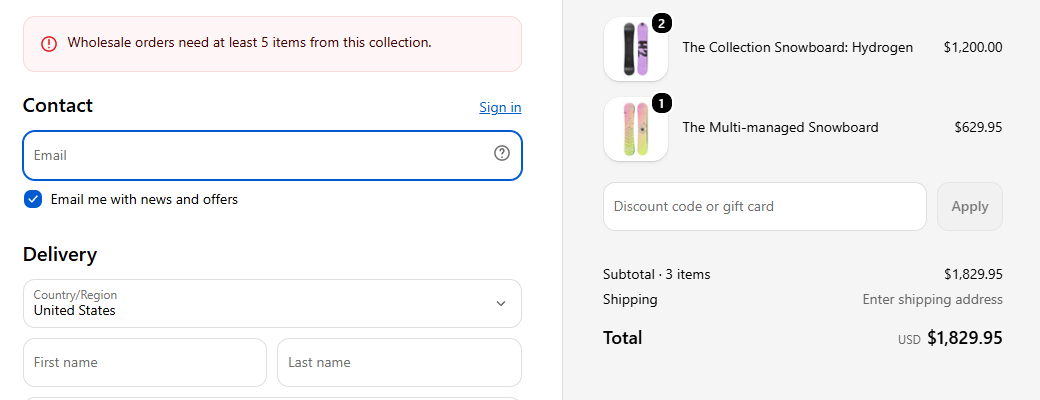
- Write the message the customer sees, in plain words: Candles ship in boxes of 12. Please adjust your quantity.
- Test it in the simulator: build a cart with 7 units and watch it get blocked, before any real customer ever sees the rule.
- Publish.
From then on a cart with 7 units cannot check out, no matter how it was built: cart page, quick buy, or Shop Pay. The customer sees your message at checkout, fixes the quantity, and the order that arrives is one you can actually ship.
Combining multiples with a minimum
Wholesale setups usually want both: order in multiples of 6, minimum 24 units. Stack two rules on the same scope. Mastiff checks both at checkout and shows whichever message applies. The free plan covers one active rule. Paid plans start at $4.99 for five rules, which handles a multiples rule plus minimums on your main lines.
This is the part our app does
Mastiff Order Limits
Order rules enforced at checkout: minimum and maximum order value, minimum and maximum quantity, and sell in multiples for case-pack MOQs, scoped to a product, variant, collection, or the whole cart, all through Shopify's own checkout validation, express wallets included. You set the rule in plain English and test it against any cart in the built-in simulator. What the simulator shows is what checkout enforces. One rule is free forever, no card needed.
What this does not do
- POS orders are not covered. A checkout validation runs on online checkout. If your staff rings up 7 units at a market stall, that is up to them.
- The rule blocks the order, it does not auto-round quantities up. Blocking with a clear message turned out to be less surprising for customers than silently changing what they ordered.